Getting Started in Frog Collector
Your first hours in the cozy shop—from piles of frogs to themed shelves that actually make sense.
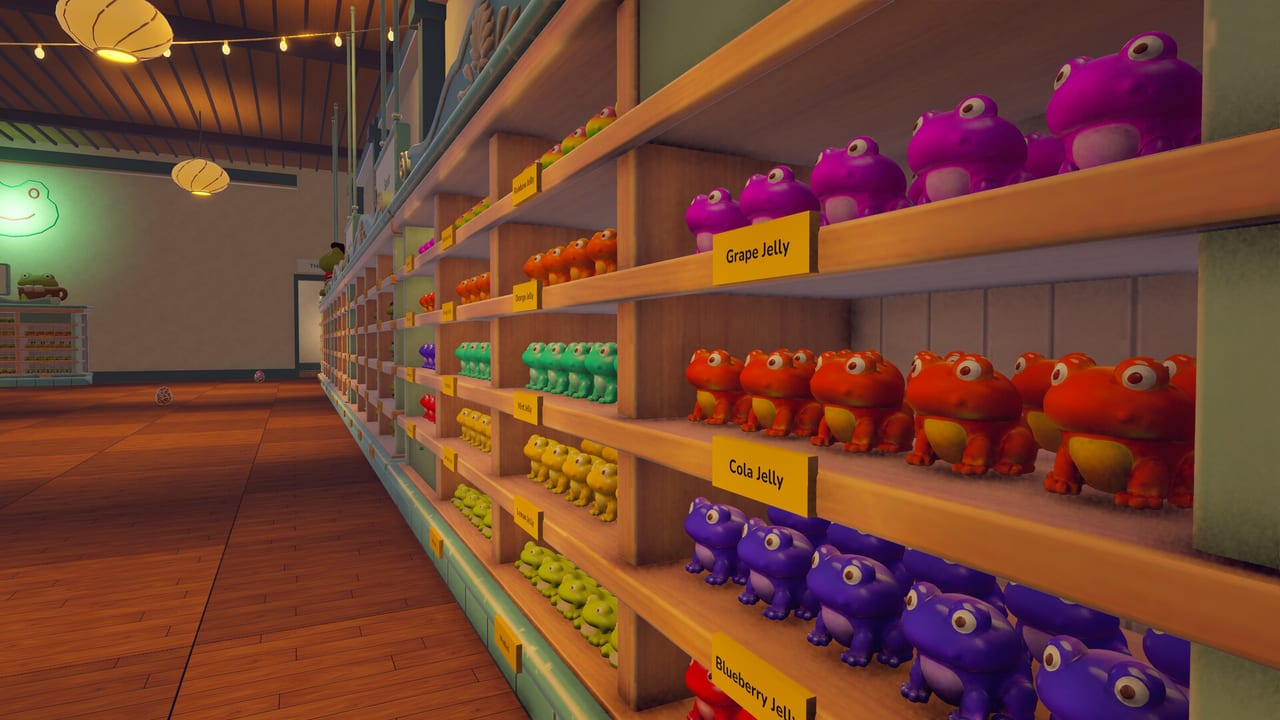
Frog Collector drops you into a warm shop overflowing with tiny frog figures. Your job is simple to say and satisfying to do: pick them up, match them to the right themed shelves, earn money for correct placements, and spend that cash on upgrades that make the next loop smoother. This day-one walkthrough gets you from boot screen to a stable sorting rhythm without wasting early currency or wandering aimlessly.
The game is a single-player cozy hobby sim / collectathon by TidyMage (developer and publisher). It released on November 18, 2026 for Windows and macOS on Steam (app 5395920), priced around $5.99. There is single-player only—the shop is yours alone. Expect roughly 4,395 frogs, soft lighting, rainy ambience, physics toys, 12 Steam Achievements, and Family Sharing. Partial controller support exists; mouse and keyboard stay clearest for precise throws (see Controls).
What you are trying to do
Every session revolves around the same friendly loop:
- Explore piles, boxes, and aisles for frog figures.
- Identify the theme or match the figure belongs to (color families, sets, shelf labels).
- Carry frogs to the correct themed shelf—within your current carry capacity.
- Place (or carefully throw) them into open slots.
- Earn money for correct placements.
- Buy upgrades that raise capacity, reach, throw strength, or matching help.
- Check the catalogue so you know what is still missing.
- Optionally hunt hidden eggs, poke at shop machines, and curate a personal favorite display case.
You can pick frogs back up and move them again. Mistakes are cheap; unfinished shelves are invitations, not failures. That freedom is why the game works as a bedtime ritual and as a completionist project.
First launch checklist
Before optimizing anything, set yourself up for comfort:
- Confirm you meet the specs on System Requirements (Windows 10 or macOS 12+ territory for minimum builds).
- Bind or confirm look sensitivity so aisle scanning does not feel floaty—details in Controls.
- Skim Launch Notes once so you know what shipped on day one.
- Open the Collection Checklist in a second window if you like ticking themes off as you go.
- Join the community via links on the Wiki / Links page (official Discord:
https://discord.gg/hZ3JPZSpkD) when you want live tips.
Walk the shop slowly on your first pass. Notice where dense piles sit relative to shelf banks. Mental maps beat frantic sprinting when figures scatter under physics.
Your first money loop (minutes 0–30)
Ignore upgrades for the first few correct placements. Learn the feel of pickup, carry, and place:
- Grab frogs that clearly match a nearby shelf theme instead of hauling across the whole store.
- Place carefully when slots are tight; save adventurous throws for open bays.
- After a handful of correct placements, open the shop upgrade options and plan a purchase—do not impulse-buy every icon.
Early money should prioritize carry capacity and reach. Capacity lets each trip move more frogs; reach reduces awkward climbing and missed edge slots. Throw power helps later when you seed shelves from a distance; matching helpers shine once you understand themes. Full spending logic lives in the Upgrades guide and is ranked for early hours on the Early Game Tier List.
First hour goals
Aim for progress you can see, not perfection:
- Complete at least one small themed shelf section end-to-end. Finished rows teach recognition faster than scattered singles.
- Unlock one capacity upgrade and one reach upgrade if prices allow.
- Open the catalogue and note which themes you have touched versus which are still empty.
- Leave one short scavenger break for anything that looks like a hidden egg or odd machine—then return to sorting. Deep egg hunting can wait for the Hidden Eggs guide.
If you feel overwhelmed by ~4,395 figures, shrink the problem: one aisle, one color family, one shelf bank. The shop rewards focus.
How matching actually feels
Figures are colorful and themed. Shelves expect matches—visual families, set identities, or labeled bays. When unsure:
- Compare the frog in hand to already-placed neighbors.
- Use matching helpers once unlocked (covered in upgrades).
- Consult the catalogue to see collection gaps instead of guessing forever.
- Relocate a wrong placement; the game expects iteration.
Physics matter. Stacks topple, throws arc, and floors collect strays. Treat the shop floor as a temporary inbox: sweep strays into intentional piles before long trips. Techniques for routing and throw placement are expanded in Efficient Sorting.
Mid-session habits that prevent burnout
Cozy games still tire your eyes. Build gentle structure:
- Batch by theme for 10–15 minutes, then stretch.
- After each upgrade, revisit an old aisle—new reach often reveals frogs you skipped.
- Alternate “fill shelves” blocks with “clear floor piles” blocks so walking paths stay open.
- When motivation dips, place a single favorite frog in your personal display case (see hidden eggs / display notes) as a palette cleanser.
What not to do on day one
- Do not save all money for late-game helpers while still carrying one frog at a time.
- Do not ignore the catalogue until “later”—later is thousands of figures away.
- Do not chase every egg before you understand shelf geography; exploration is richer when you know where themes live.
- Do not assume controller binds are fully mapped for every precision task—verify in Controls.
- Do not skip Launch Notes if something feels off versus a trailer; day-one patches happen.
Day-two roadmap
After your first session:
- Re-read Upgrades with your actual bank balance in mind.
- Draft a route using Efficient Sorting.
- Schedule a discovery loop with Hidden Eggs.
- Rank remaining early buys against the Early Game Tier List.
- Update the Collection Checklist so progress stays visible.
- Browse the full Guides Hub and Tier List Hub when you want adjacent topics.
Achievement, DLC, and sharing notes
There are 12 Steam Achievements. Play naturally first; many will fall out of sorting, upgrading, and light exploration. When you want a structured trophy plan, open the Achievements guide. Optional Supporter Pack DLC adds Pocket Shelves puzzles on shop computers—details in the Supporter Pack guide. Family Sharing means another household library user can try the shop without a second purchase—handy for cozy evenings even though the game itself is single-player.
Mindset
Frog Collector sells quiet competence: rainy ambience, soft light, and the click of a figure finding its home. Day one is not about finishing 4,395 frogs. It is about learning the loop, buying the upgrades that respect your time, and leaving the shop tidier than you found it. When you are ready to go deeper, the rest of this wiki—from Guides to Tools to Updates—is built to meet you at that pace.
Boot in, pick up a frog, and place it where it belongs. The collection grows one correct shelf at a time.
Frequently Asked Questions
Quick answers to the most common Frog Collector questions.
How long is the first useful session?
Thirty to sixty minutes is enough to learn pickup and place, finish a small shelf section, and buy your first capacity or reach upgrade.
What should I buy with my first earnings?
Prioritize carry capacity and reach. Throw power and matching helpers matter more once you understand themes—see the Upgrades guide and Early Game Tier List.
Can I fix a frog placed on the wrong shelf?
Yes. You can pick figures back up and move them. Iteration is part of the design.
Is there multiplayer?
No. Frog Collector is single-player only. Family Sharing still lets another Steam user on your family plan access the game.
Where do I track which frogs or themes I still need?
Use the in-game catalogue plus this wiki’s Collection Checklist tool for theme-level tracking.